If server hardware is the engine of your website, the operating system is the driver. You can rent the most powerful physical machine on the market, but without the right software environment instructing it how to allocate memory, process requests, and run your applications, that hardware is useless.
When you configure your hosting, deciding between server operating systems is a foundational choice that dictates everything from what software you can install to how much your monthly licensing will cost. In this guide, we will break down exactly what a server OS does, compare the options available in the hosting industry, and help you choose the right environment for your project.
What Do Server Operating Systems Actually Do?
At its core, an operating system acts as the bridge between physical hardware components (like RAM, CPU, and storage drives) and the software applications you want to run.
While a desktop OS (like standard Windows 11 or macOS) is built primarily for a graphical user interface and foreground applications like web browsers or word processors, a server OS is engineered differently. It is optimized for background processes, multi-user connections, extreme network security, and maximum uptime. You cannot simply host a high-traffic website on a standard desktop OS without experiencing massive security vulnerabilities and resource bottlenecks.
The Core Operating Systems (And One Specialized Niche)
For modern web hosting, the market is overwhelmingly dominated by Linux and Windows, with Unix operating within a highly specialized niche.
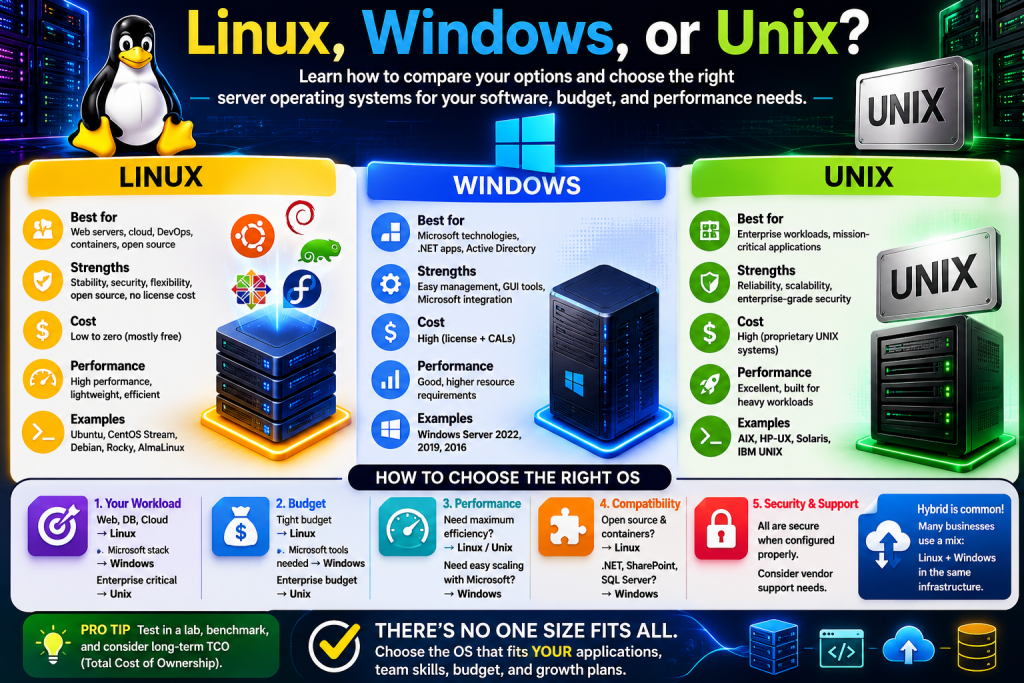
1. Linux Servers: The Industry Standard Linux is the undisputed king of web hosting. It is an open-source architecture that runs the vast majority of the internet. Following the discontinuation of CentOS, modern Linux hosting environments are typically powered by robust distributions like Ubuntu, AlmaLinux, and Rocky Linux.
- Pros: It is incredibly secure, requires less overhead to run smoothly, and benefits from massive community support. Because it is open-source, there are generally no licensing fees, keeping your hosting costs down. Furthermore, industry-standard control panels like cPanel are built natively for Linux environments.
- Best for: The vast majority of websites. If you are running WordPress, a standard PHP/MySQL application, or a budget-conscious deployment, Linux is the automatic choice.
2. Windows Servers: The Enterprise Environment Windows Server is Microsoft’s commercial server ecosystem. While less common for everyday blogs or standard eCommerce sites, it is absolutely essential for specific corporate environments.
- Pros: It offers seamless integration with other Microsoft environments (like Active Directory) and provides native support for the Microsoft technology stack, including ASP.NET frameworks and MSSQL databases.
- Best for: Businesses running custom web applications specifically built on Microsoft technologies, or enterprise architectures reliant on legacy corporate software.
3. Unix Systems: A Highly Specialized Alternative Unix-based environments occupy a distinct, narrow space in the modern hosting world. Systems like FreeBSD descend from the original Unix on a separate branch from Linux, making them parallel cousins rather than parent and child.
- Why it’s rarely the first choice: It requires deep, specialized administrative knowledge and lacks the broad, plug-and-play software compatibility of modern Linux distributions.
- Best for: Specific enterprise infrastructure, massive custom databases, and technical environments where legendary stability and advanced networking capabilities outweigh user-friendliness.
How to Choose the Right OS for Your Project
Making the right choice usually comes down to three strict constraints:
- Application Requirements: The software you need to run dictates the OS. You cannot natively run a Microsoft ASP.NET application on a Linux server. Conversely, while you can technically run WordPress on a Windows server, it is highly inefficient compared to running it in its native Linux environment. Let your web application make the decision for you.
- Control Panel Compatibility: If you or your team rely on specific server management software, check its compatibility. For instance, the immensely popular cPanel is strictly a Linux-only application. If you require Windows, you will need to use an alternative like Plesk (which supports both).
- Budget & Licensing: Linux distributions are open-source and free. Windows Server requires a paid commercial license. If your application does not explicitly require Microsoft technologies, choosing Linux avoids unnecessary monthly overhead.
Frequently Asked Questions
Linux vs. Windows: Which is better for a web server? Neither is inherently “better,” but Linux is the better choice for most users. It is cheaper, powers standard CMS platforms like WordPress perfectly, and consumes fewer system resources. Windows is only “better” if your specific application requires the Microsoft technology stack.
Can I change my server operating system later? Technically, yes, but it is not a simple settings toggle. Changing your OS requires a complete wipe and reinstall of the server, meaning you must fully migrate all your website data, databases, and configurations. It is highly recommended to choose the right OS from day one.
Do I need to know the command line to use Linux? Not necessarily. While unmanaged Linux servers require command-line knowledge (via SSH), most web hosts provide managed environments or install a graphical user interface like cPanel. These control panels allow you to manage your server, databases, and files visually, without ever typing a single line of code.
Take the Next Step
The operating system you select dictates the limits of what you can build. Now that you understand the fundamental differences between the major architectures, you can confidently select the environment that supports your exact application stack and budget. Explore our specific categories for Linux Servers, Windows Servers, and Unix Systems to compare configurations and find your ideal hosting foundation.ation.